USER_SELECT
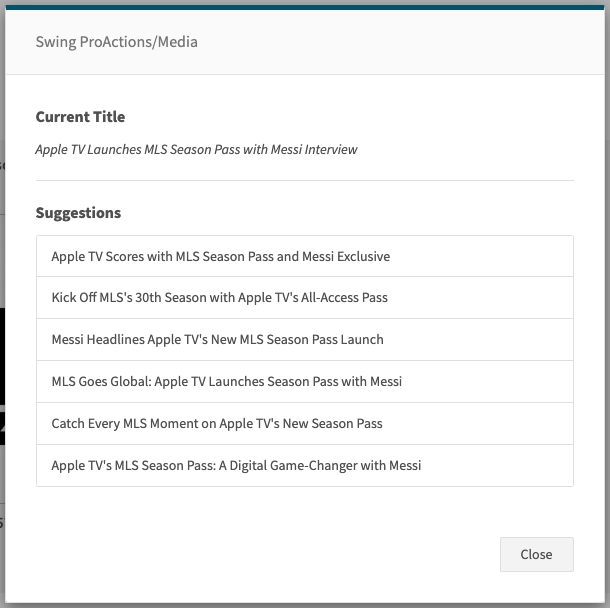
Displays a selection modal allowing the user to pick one item from a list. The list may be provided directly or produced by a pre-processing step (inlineSteps). The selected value is written to the default text output.
Images
At a glance
- Category UI
- Version: 1.0.0
- Applications: all
- Scope: all
Config Options
| Name | Description | Default | Required | Resolved | Constraints | Conditional Rules |
|---|---|---|---|---|---|---|
inlineSteps | Optional steps to execute before showing the selection modal. Useful to prepare or transform input. | None | false | false | None | None |
promptText | Prompt or title text shown at the top of the selection modal (supports variable resolution). | None | false | true | None | None |
infoTitle | Optional title shown above additional info in the selection modal. | None | false | true | None | None |
infoText | Optional descriptive text shown in the selection modal (supports variable resolution). | None | false | true | None | None |
enableKeyboardControl | Enable keyboard navigation in the selection modal. | None | false | false | None | None |
Inputs
| Type | Description | Default | Required | Resolved |
|---|---|---|---|---|
list | List of options for the user to select from. If omitted, converts text input to a list automatically. | None | false | false |
Outputs
| Type | Description | Optional |
|---|---|---|
text | The selected option (string) stored in the default text output. | false |
Examples
Simple selection from a list
- step: USER_SELECT
  promptText: "Choose an option"
  # list can be taken from prior steps or from the flowContext
Selection with inline list generation
- step: TO_LIST
  # prepare list in flowContext.list

- step: USER_SELECT
  inlineSteps:
    - step: TO_LIST
See Also
General Resources: